Fix my Xero setup
Set up Xero yourself and not sure you’ve got everything right?
We'll review your setup, identify anything that needs correcting and help you get it sorted, so you can move forward with confidence.
Common Xero setup mistakes we find
Xero is easy to start, but a good setup is more than the right settings and the right data brought in. It’s also deciding how Xero should work for your business: how you’ll record bills, receipts and payments, and what fits the way you operate. Those early decisions affect every transaction after them. Here’s what we find most often:
-
Opening balances for your bank accounts are missing or wrong.
There are gaps or duplicates in the bank feeds between your Xero start date and the date your bank feeds began.
-
If you have a business savings account, a credit card used mainly for business or a PayPal account, these should be set up to feed into Xero too.
-
You need a clear approach for when to enter supplier invoices as bills and when to code payments straight from the bank feed using bank rules.
We often find bills still showing as unpaid because the payment was also entered as spend money, so the expense is counted twice.
-
Common examples are overseas subscriptions where no GST was charged, council rates, stamp duty, water, basic food, ASIC fees, and purchases from suppliers who aren’t registered for GST.
-
Transfers between your own accounts recorded as income and expenses. This overstates both, and your GST too if a GST code was applied.
-
Payments or receipts recorded against a bank account they didn’t actually go through, so that account won’t reconcile to your statement.
-
When you pay for business purchases with cash or your own money, they still need to be recorded, so you can claim the expense and keep track of the money you’ve put in.
-
If Xero hasn’t been set up as your payroll software in ATO Access Manager, your STP reports won’t go through.
-
If your activity statement settings, such as cash or accrual and how often you lodge, don’t match what’s registered with the ATO, Xero’s BAS figures could be wrong. Accounts with the wrong default GST code cause the same problem.

Who is our Fix My Setup service for?
Business owners who have set up Xero themselves, have recently started using it, and want to know it’s right before setup issues compound into bigger problems. If you’re more than 6 months behind, you need our Rescue My Bookkeeping service.
What we look at
We start with what you’ve asked us to fix. While we’re in your file, we also check the key areas of your setup, so nothing important gets missed:
Start date and opening balances
Bank accounts and feeds
GST and BAS settings
Chart of accounts and invoice templates
Payroll and Single Touch Payroll
Security and ATO access
We also work out with you how Xero should run day to day:
Procedures that suit your business, such as when to enter bills and when to code straight from the bank feed, and how to handle receipts, cash and payments from your own funds
Transaction rules that are right for your business, including bank rules and which accounts and GST codes to use for your regular transactions
Anything we find goes into your repair plan, in order of priority, so you can decide what to fix now.
How it works
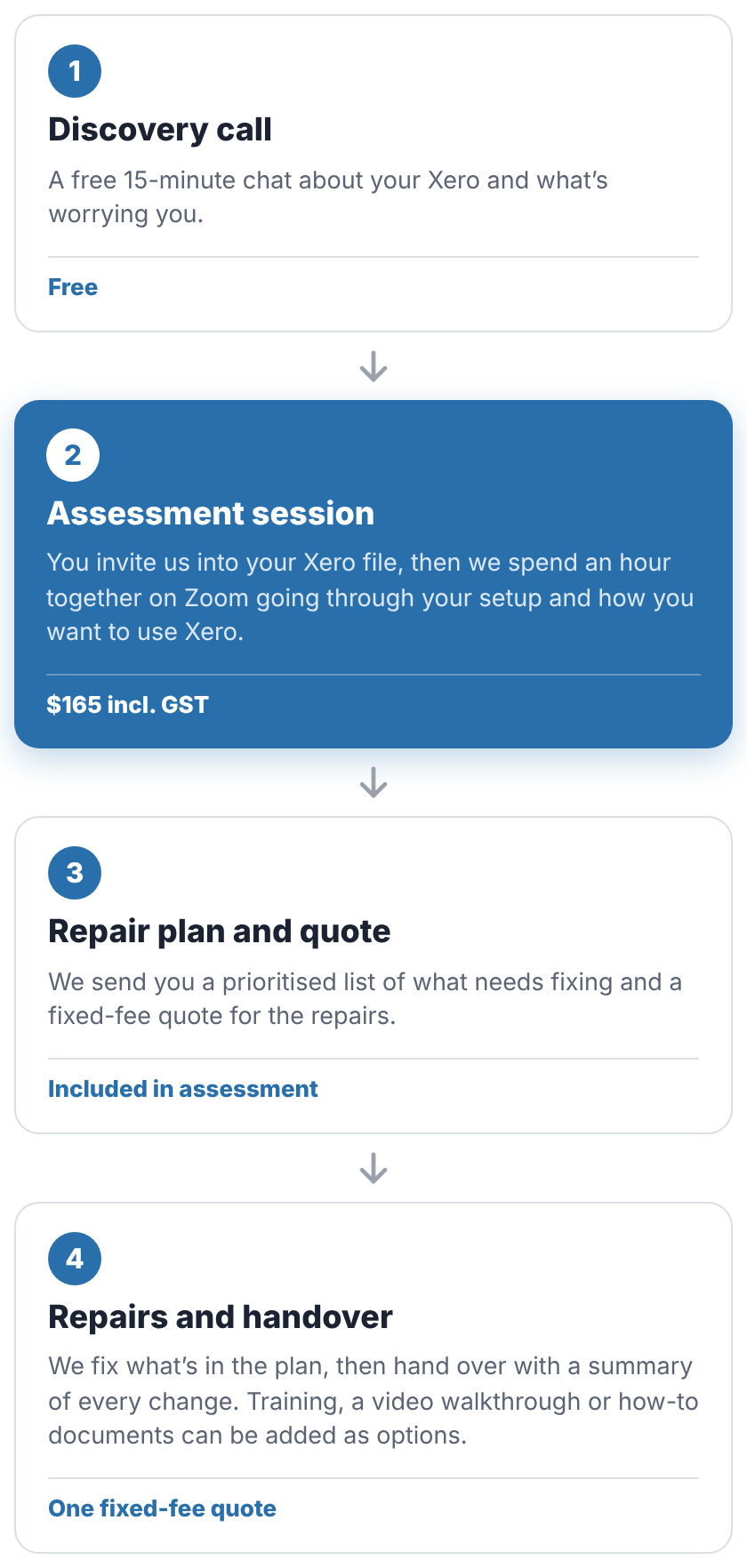
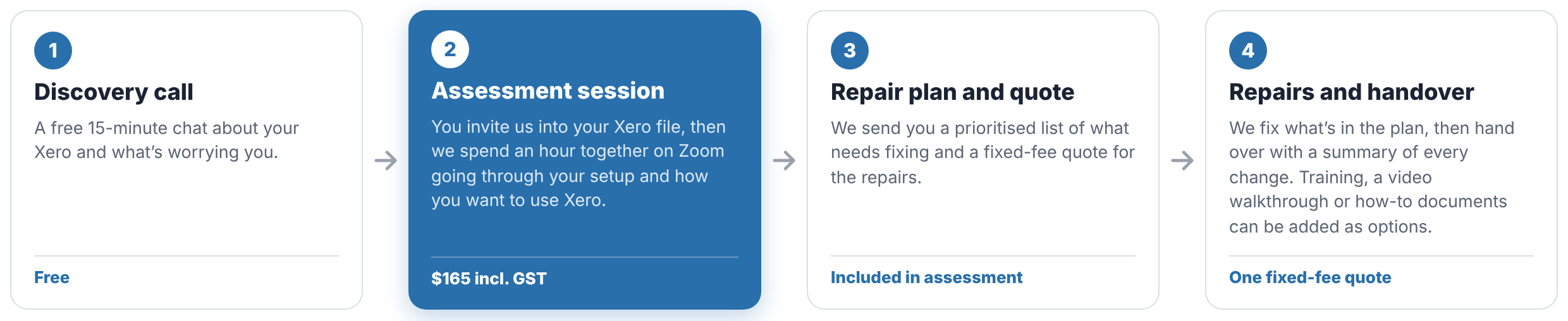
Four clear steps. You always know what happens next and what it costs before any repair work starts.
Get your Xero set up right from the start
Book a free 15-minute call to discuss what’s worrying you about your Xero setup. We’ll let you know whether an assessment session is the right next step, or whether something else would suit you better. There’s no obligation.
Registered BAS Agent | Xero-certified specialist