How to invite your Bookkeeper or Advisor to Xero
Xero has changed the way advisor access is described.
What was previously known as the Advisor role is now called Administrator. If you are inviting your bookkeeper, BAS Agent or Xero Certified Advisor into your Xero file, Administrator is generally the role they will need in order to properly review your setup, access settings, run reports and work across the areas of the file relevant to your business.
If Love Your Books has asked you to provide access to your Xero organisation, follow the steps below.
How to invite Love Your Books to your Xero file
1. Log in to Xero
Log in to the Xero organisation you would like us to access.
2. Open your organisation settings
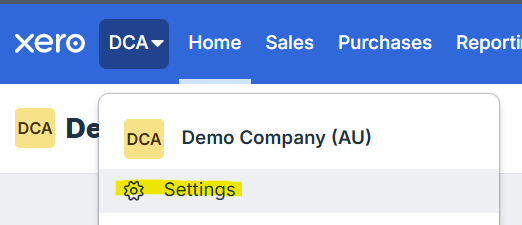
Click your organisation name in the top left corner of Xero, then select Settings.
3. Open Users
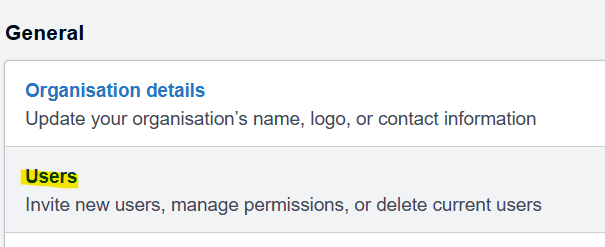
Under the General settings area, select Users.
You will need permission to edit users in order to send an invitation.
4. Add a new user
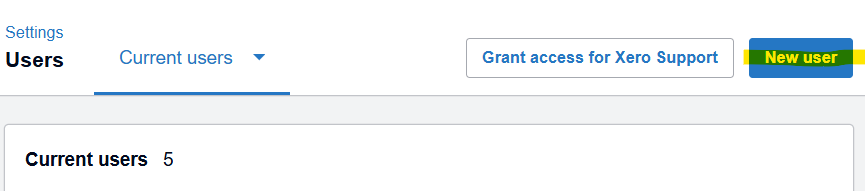
Click New user.
5. Enter the name and email address for your advisor
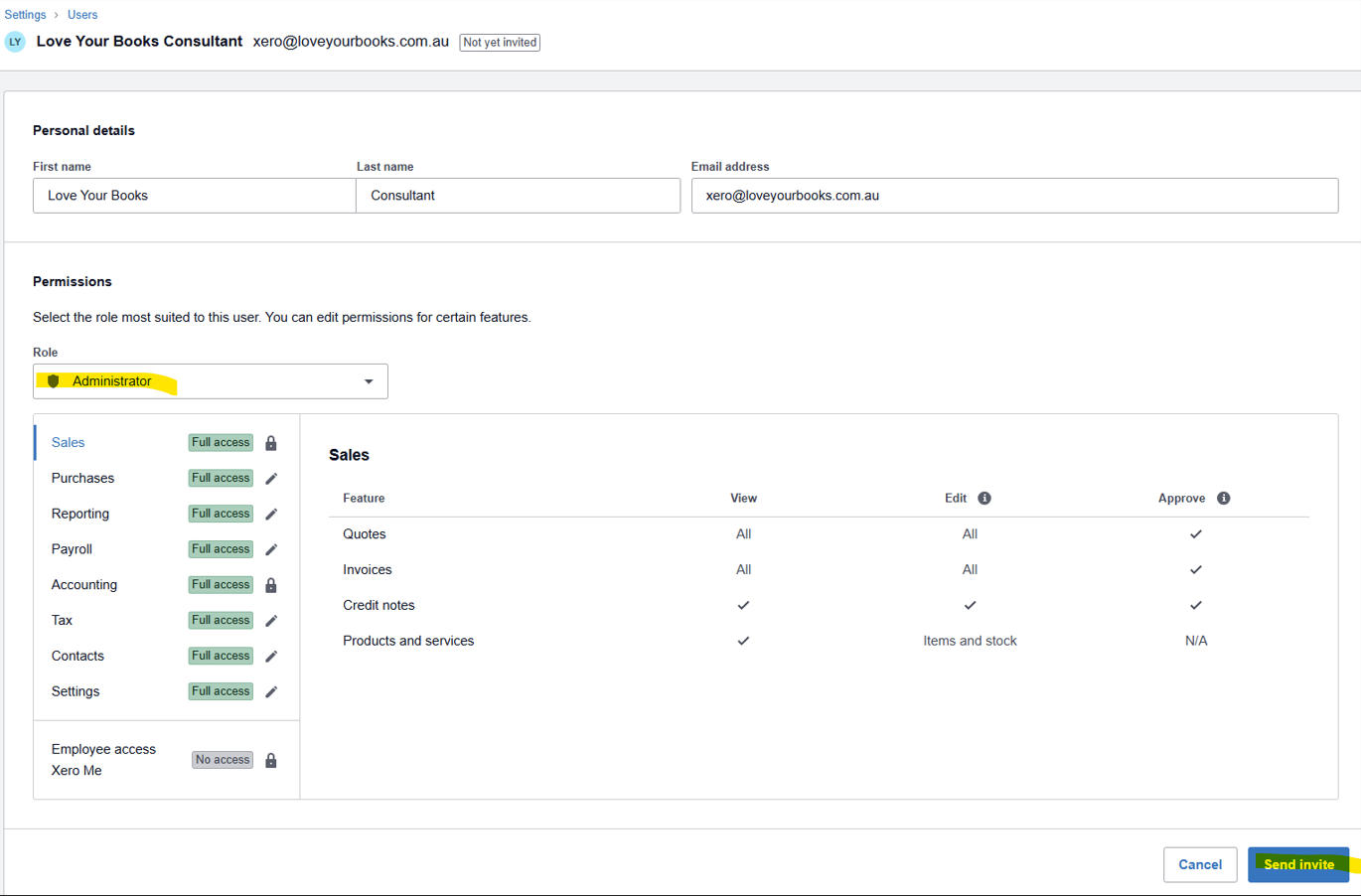
Enter the name and email address provided in the Personal Details section.
6. Select Administrator access
Under the user role, select Administrator.
This is the role Xero previously referred to as Advisor access. Administrator access allows us to properly review areas such as:
organisation and financial settings
bank accounts and reconciliation
invoices and bills
contacts
reports
payroll configuration
manual journals and other accounting settings
Some areas of Xero are not visible with more limited permissions, which can make it difficult to properly assess how a file has been configured.
7. Send the invitation
Click Send invite.
Xero will email the invitation to us and we will accept it once received.
If we are only reviewing your Xero file
Sometimes we will ask for access before preparing a proposal or recommending the best next step.
In this situation, the purpose of the access is to allow us to understand how your Xero file is currently configured and identify anything that may affect the scope of work.
We will not alter, delete, reconcile, code or otherwise change your Xero data during a pre-engagement review.
Any information we view will be treated as confidential and used only for the purpose of assessing your Xero setup and determining the appropriate next step.
Why do you need Administrator access just to review the file?
A limited user can see day-to-day transactions, but some of the information we may need to assess sits in areas such as organisation settings, financial settings, payroll configuration and other administrative areas.
Administrator access allows us to see the complete setup rather than make assumptions based only on the transactions that are visible.
Giving us Administrator access does not mean we will make changes to your file. The level of access determines what we can see and work with, while the scope of our engagement determines what we are authorised to do.
Can I remove access later?
Yes. You remain in control of your Xero organisation and can remove our access at any time through your Xero user settings.
If our access was provided only for an initial review and you decide not to proceed with further work, you are welcome to remove the user once the review is complete.
Need help?
If you have any difficulty adding us to your Xero organisation, please contact us and we can guide you through the process.